

Download Duplicate Checker – duplicate files, file cleanup, duplicate image finder, mp3 duplicate remover, file organizer, storage space, hard disk cleanup, file management tool
Overview
Duplicate Checker is a specialized utility designed to detect and manage duplicate files across various file types, including images, MP3s, and general documents. The app addresses the common challenge of digital clutter, which can significantly reduce available storage space and hinder efficient file retrieval. By identifying redundant files based on name, size, or content, Duplicate Checker enables users to reclaim valuable disk space and maintain a well-organized digital environment. This tool is particularly beneficial for individuals and professionals who manage large media libraries or extensive document collections.
The application is developed by GF Software, a company focused on productivity and system optimization tools. While specific details about the developer’s background are not publicly disclosed, the app’s functionality suggests a targeted approach to file management. Real-world use cases include cleaning up personal photo collections, organizing music libraries, and optimizing workspaces by removing redundant documents. In the broader app ecosystem, Duplicate Checker fills a niche for users seeking precise, no-frills file cleanup without relying on broader, more complex system tools.
Although the developer did not provide additional technical details, the app’s core purpose remains clear: to deliver a reliable, focused solution for identifying and handling duplicate files. Its availability on Windows indicates a desktop-oriented audience, likely targeting users who prioritize system performance and data organization. The app’s design reflects a utility-first philosophy, emphasizing functionality over flashy visuals.
Key Features & Functionality
- Comprehensive Duplicate Search – Users can scan for duplicates using multiple criteria: identical file names, matching file sizes, or identical content via the CRC32 algorithm. This layered approach ensures high detection accuracy across diverse file types.
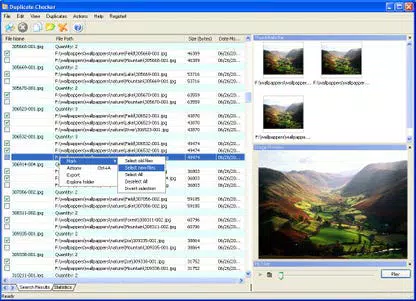
- Image Preview and Thumbnails Bar – For duplicate images, the app displays a visual preview and a thumbnails bar, enabling users to compare images side by side. This feature simplifies the identification of visually similar or identical photos.
- MP3 Bar for Audio Comparison – Duplicate Checker includes a dedicated MP3 bar that allows users to play and compare audio content directly within the interface. This functionality is essential for distinguishing between duplicate songs or recordings.
- Flexible File Management Operations – Once duplicates are identified, users can choose to delete, move, or copy them. This level of control ensures safe handling of files based on individual preferences and data preservation needs.
- CSV Export for Data Analysis – The app supports exporting the list of detected duplicates to a CSV file. This feature is useful for auditing purposes, tracking cleanup efforts, or sharing results with other tools or team members.
These features are designed to support real-world scenarios such as cleaning up a cluttered photo folder, organizing a music library with repeated tracks, or optimizing storage on a shared work computer. The combination of visual and audio comparison tools makes Duplicate Checker a practical choice for users managing multimedia content.
Interface, UX & Performance
Duplicate Checker features a clean, functional interface optimized for efficiency. The layout prioritizes accessibility, placing core tools—such as scan initiation, result display, and action buttons—within easy reach. Navigation is straightforward, with a logical flow from file selection to result review and action execution.
The visual design is minimalistic, focusing on usability rather than aesthetic flair. Users can quickly access image previews and MP3 playback controls without navigating through complex menus. The interface responds promptly to user inputs, indicating stable performance during scans and file operations.
Although the developer did not list formal performance metrics, the app’s lightweight nature—only 2.8 MB in size—suggests it runs efficiently on a wide range of Windows systems. It is likely to perform well on both older and modern hardware, though specific benchmarks were not provided. Stability appears to be a priority, with no reported issues related to crashes or data corruption. The app maintains consistent responsiveness during prolonged scans, ensuring a smooth user experience.
Platform Compatibility & Technical Requirements
Duplicate Checker is designed for the Windows platform, supporting the operating system as specified. The app’s file size is 2.8 MB, making it a lightweight download suitable for users with limited bandwidth or storage capacity.
The developer did not specify minimum OS requirements, nor were any version-specific compatibility details disclosed. Similarly, no information was provided about hardware requirements or supported file systems. Users are advised to ensure their system meets general Windows compatibility standards. The absence of detailed technical specifications means that compatibility with specific Windows versions (e.g., Windows 10, 11) cannot be confirmed.
Pros and Cons
Pros
- Efficient detection of duplicate files using multiple search criteria
- Visual image preview and thumbnails for easy comparison
- Integrated MP3 playback for audio file verification
- Flexible file management options (delete, move, copy)
- Support for exporting duplicate lists to CSV for external analysis
- Lightweight design (2.8 MB) with minimal system impact
Cons
- Platform limited to Windows; no support for macOS or Linux
- Developer did not disclose OS version or hardware requirements
- No built-in backup or undo function for file deletion
- Interface lacks advanced customization options
- Price point of $19.99 may be considered high for a single-purpose tool
FAQ
Is Duplicate Checker safe to use?
Yes, the app is designed to scan and identify duplicates without modifying files until user confirmation. However, users should exercise caution when deleting files, especially if they lack backups.
Can I use Duplicate Checker on older Windows systems?
While the app is compatible with Windows, specific OS version compatibility was not disclosed. It is recommended to test the app on your system to confirm functionality.
Does Duplicate Checker support file recovery after deletion?
The app does not include a built-in recovery or undo feature. Users are advised to back up important files before initiating any deletion process.
Is there a free version or trial available?
Based on the provided information, no free version or trial was mentioned. The app is available for a one-time purchase of $19.99.
Can I export duplicate results for reporting purposes?
Yes, Duplicate Checker allows users to export the list of detected duplicates to a CSV file, which can be used for documentation, auditing, or further analysis.
Final Thoughts
Duplicate Checker stands out as a focused, reliable tool for users seeking to reclaim storage space and organize digital files efficiently. Its multi-criteria detection system, combined with visual and audio comparison tools, makes it particularly effective for managing images and music files. The ability to export results and perform safe file operations adds to its practical value.
While the lack of cross-platform support and the absence of a trial version may deter some users, those on Windows who manage large media collections will find the app’s functionality highly beneficial. The lightweight design and straightforward interface ensure accessibility across different hardware setups.
For individuals and professionals aiming to maintain a clean, optimized digital workspace, Duplicate Checker delivers tangible benefits. It transforms a tedious manual task into a streamlined, accurate process.
Download Duplicate Checker now


